
07 TIME TO CONNECT
Run your Daily
Review work one row at a time and guide the conversation.
Screenshots use sample data and show the French interface.
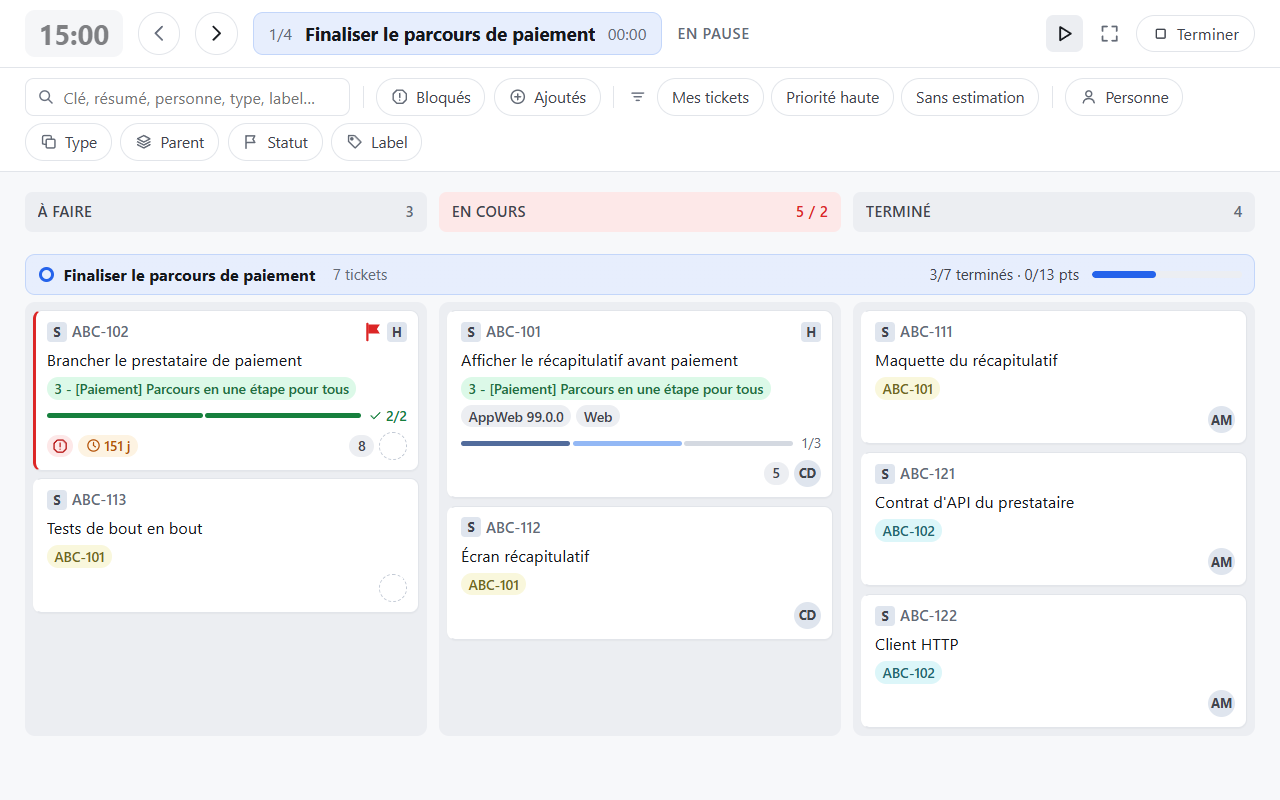
Review the work together
- Set your filters: they stay active during the meeting.
- Click Daily on the right of the header.
- Move through rows with Previous swimlane and Next swimlane, or the ← / → keys.
- Use Pause timer or Resume timer to match the discussion's pace.
- Click Finish to return to the board.
Daily works in Scrum and Kanban. It goes through rows containing visible issues and skips empty goals. Cards can still be opened and moved. In the first column, + N more reveals additional cards and Show less collapses them again.
Adjust the presentation
Set the duration in Board settings → Board → Display and Daily. The timer covers the whole session; a separate indicator shows time spent on the current row.
Chrome may open full screen. Escape first exits full screen without ending the Daily. Reloading the page stops the session.
To present the board without stepping through its rows, use Presentation mode, then Exit to return to the normal view. Leave this mode before using Back to Jira.