A NEW PERSPECTIVE. YOUR JIRA.
Give your work
direction in Jira.
Your goals in focus. Your issues in the right place. Bring purpose to the work on your Scrum and Kanban boards.
Chrome extension·Jira Cloud
French, English or Spanish. Follow your Jira language, or choose your own.
THE RIGHT QUESTIONWhich goal are we moving forward?
A shared direction.
An aligned team.
Real interface in French · sample data
An aligned team.
◎ Goals come first▤ Scrum & Kanban↗ Right inside Jira◇ Your session. Your permissions.
01 / MAKE THE WORK MEAN SOMETHING
Turn a task list
into a direction.
A goal gives you direction.
The board makes the path visible.
Simplified animated demo.
Sample data, no connection to Jira.
 Sprint 24
To do 2In progress 2Done 1
Make payments reliableGoal 01
Make the first purchase easierGoal 02
RUNNo goal
Goals give the board structure. Work without a goal keeps its place in Build or RUN.
Your day-to-day stays in Jira.
The perspective changes.
02 / YOUR BOARD, FROM A NEW ANGLE
It’s your Jira.
You’ll feel right at home.
The same issues. The same workflows.
A view designed to keep what matters in focus.
ONE SPRINT, ONE DIRECTION
Goals set the pace.
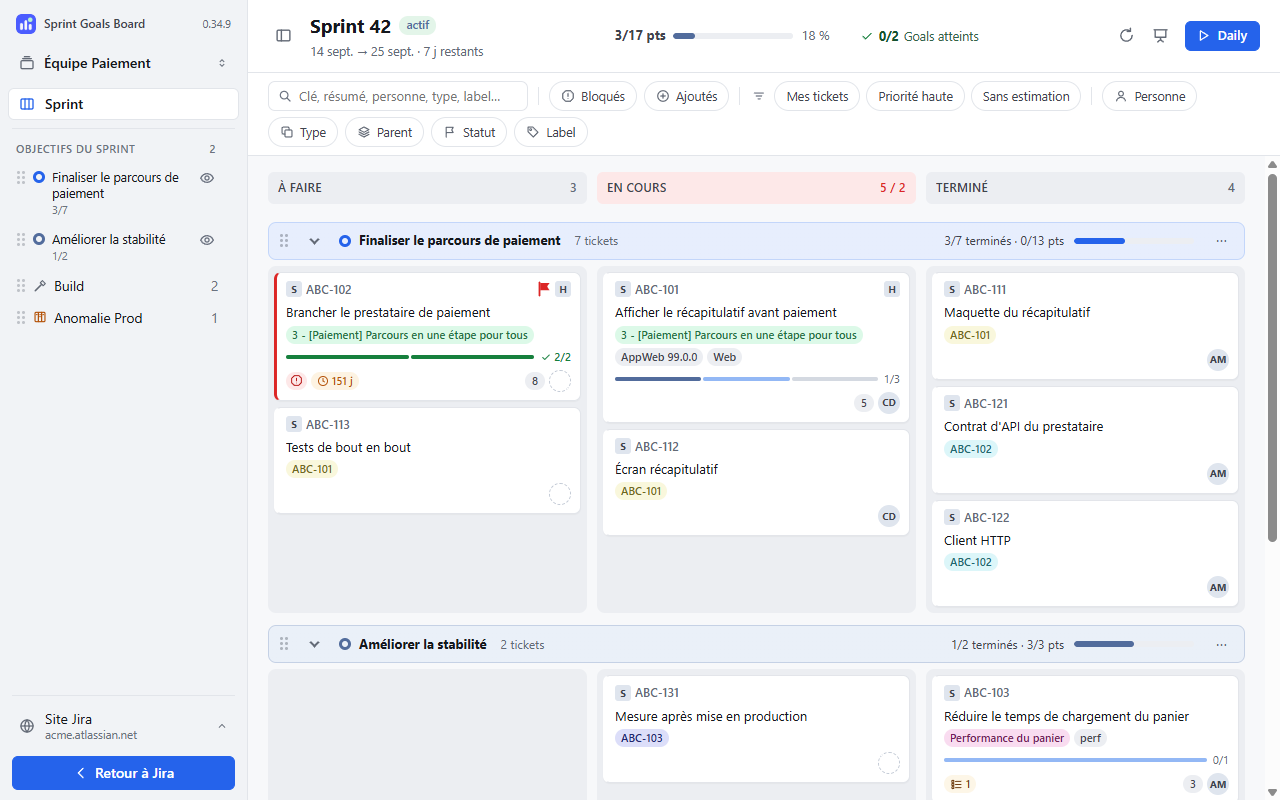
See sprint progress, find blocked issues and move between goals without losing context.
Screenshots in FrenchSample data
Your familiar actions.
Move your cards. Open Jira’s native issue details and transition forms.
Your way to read the board.
Set up Build and swimlanes by issue type. Customize fields and card colors with validated JQL.
Your team rituals.
Lead your Daily one goal at a time. Switch to presentation mode to share the board with your team.
03 / SIMPLE BY DESIGN
Your Jira stays
your Jira.
The extension uses your Jira session and respects your access permissions. You stay in control.
Read the privacy policyNo extra account.Use your usual Jira sign-in.
No publisher data collection server.Your work data is read directly from Jira.
A shared configuration.Board settings are saved in Jira; personal preferences stay in Chrome.
04 / MAKE IT YOURS
A fresh perspective.
In three steps.
- 01↗
Install.
Open the official Chrome Web Store listing, then add Sprint Goals Board to Chrome.
Follow the getting started guide - 02↗
Allow access.
Enter your Jira Cloud address and allow Chrome to access that site.
Your usual Jira session is all you need. - 03◎
Change your perspective.
Open your board and click Sprint Goals. Give your goals their own space.
Scrum or Kanban. Your choice.
How do I choose the extension language?
In Auto mode, the interface follows Jira in French or Spanish, and uses English for other languages. Choose Auto, Français, English or Español in personal preferences, available from administration or the site menu in the extension. The change is instant and leaves your issues, goals and statuses in their original language.
Does it work with my Kanban board?
Yes. The extension uses your Kanban board’s filter and columns, with goals from Atlassian Goals. In Scrum, you can also use individual lines from the sprint goal text.
Do I need to set up the whole board again?
No. Columns, statuses and issue types are read from Jira. You can then customize swimlanes and cards. Settings already shared by your team are picked up automatically.
Does it change my Jira permissions?
No. Actions still follow your Jira permissions. Shared settings require board editing access, and transitions follow your workflow.
How do updates work?
Chrome updates the extension automatically from the Chrome Web Store. Restarting your browser can help apply a pending update. On a company-managed browser, your administrator’s policies apply.